
Custom Business Process Automation Solutions
Sync databases, integrate APIs, and automate manual administrative stages.
Quick Answer: What is business process automation?
Business process automation (BPA) is the integration of custom software modules, background sync engines, and API webhooks to automate manual data entry. It replaces spreadsheet-syncs, files copy-pasting, and task assignment alerts with automated background processes.
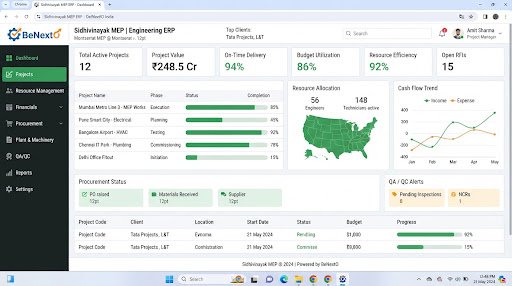
Operational Landscape Overview
Who Needs This System?
Firms losing hours copy-pasting customer details across separate software programs
Organizations experiencing delay bottlenecks in document approvals
Businesses managing inventory counts and dispatch notices on separate platforms
Operations leads needing real-time alerts for system discrepancies
Common Issues Resolved
Manual Data Entry
Copy-pasting transaction logs across portals wastes labor hours and causes errors.
Approval Bottlenecks
Operations pause as purchase records or work files sit in manager email boxes.
Delayed Status Updates
Inbound supply arrivals are not logged instantly, delaying production steps.
Functional System Modules
To match your operational requirements, possible modules we can engineer include:
Data Sync Engine
Connects database tables to copy transaction logs automatically.
- Webhook API listeners
- Data mapping panels
- Error tracking logs
Approval Scheduler
Manages digital sign-off pipelines, routing approvals to coordinators automatically.
- Review dashboards
- Signature registers
- Escalation timer alerts
Example System Workflow
Trigger Action
Client submits invoice payment on payment gateway.
Verify Payment
System webhook registers payment confirmation.
Sync Database
Database syncs ledger record, changing invoice status to paid.
Alert Procurement
System dispatches raw stock purchase request to vendor.
Notify Customer
System sends WhatsApp alert with shipment tracking details.
* Note: Workflows are configured and customized strictly around your business operational patterns.
Scannable Features Matrix
Webhook Listener
Dedicated endpoints that process transaction details from external systems.
Purpose: Ensures instant database updates.
Automation Logic Editor
Configure trigger-action pathways for system operations.
Purpose: Allows rules updates without rewriting code.
Error Tracker Logs
Maintains details of failed sync attempts for troubleshooting.
Purpose: Protects database integrity.
Automation Opportunities
Inbound payment gateways webhooks updating sales registers instantly.
Uncompleted project stage durations dispatching escalation alerts to coordinators.
Low inventory levels auto-generating purchase order details for manager review.
Role-Based Access Controls
System Engineer
Configure database triggers, adjust API keys, review error logs, and manage permissions.
Workflow Auditor
View transaction status boards and download processing logs.
Manager
Approve pending transaction holds on system dashboards.
Reporting & Dashboard Areas
Process Volumes
Total counts of transactions synced by period.
Error Ratios
Sync success rates vs failed API connection counts.
Time Saved
Estimated labor savings based on automated transactions.
Generic Integration Possibilities
Payment system webhooks
SMS & WhatsApp API servers
Legacy database connectors
Corporate email clients hooks
Implementation Blueprint
01 Requirement Discovery
02 Process Flow Mapping
03 Database Architecture Planning
04 User Interface Layouts Design
05 Custom Code Engineering
06 Strict QA Verification Testing
07 System Rollout Deployment
08 User Optimization
Cost Sizing Drivers
Number of API endpoint connections to configure
Complexity of verification checks for synced data
Data transformation requirements between systems
Related Technical Services
Business Automation FAQs
Can we sync data from local database servers?
Yes, we connect local servers to cloud databases using secure APIs.
What happens if a background sync fails?
The system logs error details and can notify administrators to allow manual checks.
Can we automate purchase order approvals?
Yes, we build digital approval chains that route orders based on department rules.
Are we charged by the number of transactions synced?
No, custom software built by BeNextO has zero recurring usage fees.
Does the system support security encryption?
Yes, database sync pathways use HTTPS protocols and encrypted API keys.
Can we customize automation rules later?
Yes, we build configuration panels to let managers adjust rules as workflows change.
Ready to Build Your Custom Business Automation?
Consult with our engineering architects in Pune. We deliver complete operational blueprints, schema diagrams, and milestone estimates.