
Custom ERP System Solutions for Growing Businesses
Centralized database environments integrating raw stock, billing, and scheduling.
Quick Answer: What is a custom ERP solution?
A custom ERP (Enterprise Resource Planning) solution is a centralized software database built to match a company's specific multi-department operations. Unlike pre-packaged SaaS options, a custom ERP adapts to your exact business rules, integrating raw materials tracking, purchase records, work scheduling, and billing files into a single unified workspace with zero per-seat licensing fees.
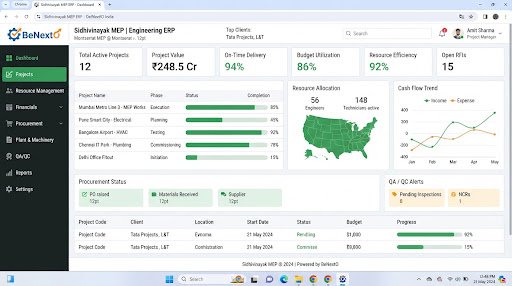
Operational Landscape Overview
Who Needs This System?
Multi-department organizations experiencing delays in data sharing
Manufacturing and engineering firms struggling to sync stock buffers with active orders
SMEs spending hours copying and pasting operational logs across separate software applications
Firms running administrative stages and accounts on fragmented manual spreadsheets
Common Issues Resolved
Fragmented Workflows
Different divisions operate in data silos, leading to delay bottlenecks as reports are compiled manually.
Inventory stockouts
Inbound supply logs are not synced with checkout counts, leading to manufacturing delays or missed delivery dates.
Delayed Operational Tracking
Managing project steps across different software tools prevents real-time tracking of milestones.
Functional System Modules
To match your operational requirements, possible modules we can engineer include:
Inventory & Raw Materials Control
Logs inbound material supplies, warehouse transactions, and automates low-stock notifications.
- Barcode mapping integrations
- Automated reorder triggers
- Stock tracking audits
Purchase & Vendor Management
Manages raw material purchase orders, vendor lists, and purchase approval chains.
- Inbound catalog approvals
- Automated billing logs
- Vendor delivery timelines
Operational Scheduling
Monitors active project steps, schedules worker tasks, and tracks completion metrics.
- Gantt charts
- Resource logs
- Workload calendars
Example System Workflow
Material Purchase
Clerk submits purchase order details in system.
Inventory Logging
System updates raw stock buffers upon warehouse delivery.
Job Allocation
Project coordinator assigns manufacturing tasks to active personnel.
Work Progress
Team updates milestone records on operational dashboards.
Dispatch Billing
System generates dispatch invoice log, updating inventory buffers automatically.
* Note: Workflows are configured and customized strictly around your business operational patterns.
Scannable Features Matrix
Centralized Ledger
A single database table structures records across engineering, sales, and billing divisions.
Purpose: Eliminates duplicate log entries.
Approval Workflows
Bespoke review portals requiring manager approval for material purchase records.
Purpose: Prevents unauthorized operations.
Role-Based Dashboards
Distinct user interfaces customized for floor clerks, coordinators, and directors.
Purpose: Simplifies employee tasks.
Automation Opportunities
Low inventory levels triggering alerts to procurement managers automatically.
Stage completions in work logs changing task priorities in scheduling registers.
Dispatched sales invoices updating tax breakdown ledgers without manual input.
Role-Based Access Controls
System Administrator
Full database permissions, system setting adjustments, and audit trail viewing.
Project Coordinator
Create work cards, update timeline milestones, and review team workloads.
Procurement Officer
Log purchase orders, update vendor files, and submit approval requests.
Reporting & Dashboard Areas
Inventory Balance
Active raw material values vs minimum safety stock levels.
Project Performance
Scheduled timeline vs actual completion hours.
Finance Summary
Active accounts receivable log totals by billing date.
Generic Integration Possibilities
UPI & bank API checkouts
SMS & email status alerts routers
Biometric log devices logs syncs
Barcode scanning registers
Implementation Blueprint
01 Requirement Discovery
02 Process Flow Mapping
03 Database Architecture Planning
04 User Interface Layouts Design
05 Custom Code Engineering
06 Strict QA Verification Testing
07 System Rollout Deployment
08 User Optimization
Cost Sizing Drivers
Number of modules integrated into the centralized dashboard
Volume of historical data migrated from legacy spreadsheet registers
Complexity of automated approval routing steps
Related Technical Services
Relevant Project Execution
Sidhivinayak MEP Consultancy
Digitizing a paper-bound engineering consultancy via a custom multi-module ERP.
ERP FAQs
Can custom ERP integrate with existing accounting systems?
Yes, we can write custom integrations to sync accounts receivables and invoicing files with standard business accounting platforms.
How long does custom ERP development take?
Timelines depend on the number of modules, but typical builds take between 12 to 24 weeks from discovery to final rollout.
Do we pay monthly licensing fees per user?
No, custom software built by BeNextO has zero monthly user licensing costs. You own the code and can add unlimited team profiles.
Can custom ERP run on local servers?
Yes, systems can be deployed to secure local network servers or hosted on protected cloud databases depending on security guidelines.
Is training included in custom ERP delivery?
Yes, we conduct hands-on training sessions for admin and floor personnel, alongside detailed user manuals for reference.
Can database tables be expanded later?
Yes, the system is designed with a scalable database layer, allowing our engineers to add new modules as your business grows.
Ready to Build Your Custom ERP?
Consult with our engineering architects in Pune. We deliver complete operational blueprints, schema diagrams, and milestone estimates.