
Custom Inventory & Stock Tracking Systems
Trace physical stock and raw supplies across multiple warehouse locations.
Quick Answer: What is a custom inventory solution?
A custom inventory management system is a tailored database built to monitor raw stock levels, warehouse bins, and dispatch logs. It unifies operations, providing real-time stock balances and automated low-stock warnings without recurring monthly seat costs.
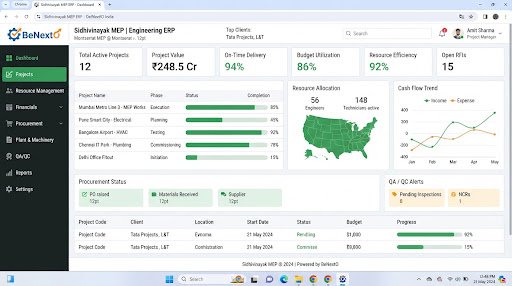
Operational Landscape Overview
Who Needs This System?
Warehouses tracking high-value items across multiple storage locations
Manufacturers needing to coordinate raw material stock buffers with floor tasks
Distributors losing time on manual paper-based stock audits
SMEs experiencing inventory stockouts due to delayed spreadsheet updates
Common Issues Resolved
Delayed Stock Counting
Checking stock levels on spreadsheets causes delays, leading to production bottlenecks.
Unsynchronized Warehouses
Separate warehouses log stock independently, leading to stock allocation errors.
Misplaced Production Parts
No unified bin location logs exist, forcing warehouse staff to hunt for items manually.
Functional System Modules
To match your operational requirements, possible modules we can engineer include:
Warehouse Tracking
Logs storage bins, warehouse locations, and inventory transfers.
- Bin location indexes
- Multi-warehouse logs
- Transfer tracking cards
Inbound Supply Registry
Logs vendor material arrivals and audits shipments against purchase orders.
- Shipment check logs
- Damage report forms
- Vendor performance tables
Example System Workflow
Inbound Delivery
Staff registers vendor material arrivals on warehouse dashboards.
Bin Allocation
System suggests bin locations based on item categories.
Stock Allocation
Factory coordinator reserves parts for active orders.
Assembly Dispatch
Clerk updates logs, transferring parts to manufacturing stations.
Final Deduction
System deducts parts from stock logs upon product packaging.
* Note: Workflows are configured and customized strictly around your business operational patterns.
Scannable Features Matrix
Bin Location Mapping
Indexes physical bin coordinates across different warehouse buildings.
Purpose: Helps staff find items quickly.
Alert Level Trigger
Automated alert configurations indicating when stock falls below safety levels.
Purpose: Prevents supply shortages.
Digital Audit Logs
Chronological logs of every item transfer, register update, and stock adjustment.
Purpose: Prevents inventory shrinkage.
Automation Opportunities
Daily stock reviews triggering notifications for low-level components automatically.
Completed sales checkout logs updating warehouse inventory balances instantly.
Purchase approvals creating inbound shipment logs automatically.
Role-Based Access Controls
Warehouse Manager
Configure bin paths, audit stock levels, approve transfers, and run reports.
Inventory Clerk
Log arrivals, scan barcode tags, and update bin locations.
Production Lead
Check component balances and request material transfers.
Reporting & Dashboard Areas
Stock Balance
Active counts, safety margins, and cost values of inventory items.
Stock Movement
Logs of parts transfers across different departments.
Stock Turnover
Average velocity metrics of raw materials by period.
Generic Integration Possibilities
Barcode & QR tag systems
Purchase database links
RFID tracker APIs syncs
Shipping systems hooks
Implementation Blueprint
01 Requirement Discovery
02 Process Flow Mapping
03 Database Architecture Planning
04 User Interface Layouts Design
05 Custom Code Engineering
06 Strict QA Verification Testing
07 System Rollout Deployment
08 User Optimization
Cost Sizing Drivers
Number of warehouse storage locations to track
RFID or barcode hardware scanning integration complexity
Volume of active inventory database items
Related Technical Services
Relevant Project Execution
Nakshit Jewels
Custom Point-of-Sale billing and inventory tracking system built specifically for jewellery retail.
Inventory Management FAQs
Can we track items using barcode scanners?
Yes, custom inventory modules can connect with barcode and QR scanner devices to update stock logs.
Does the system support multiple warehouse locations?
Yes, you can track stock balances, bin paths, and material transfers across separate physical warehouses.
Can we configure automatic low-stock email alerts?
Yes, the system can automatically send alerts to purchasing managers when stock levels drop.
How do you handle stock audits?
We build adjustment screens where managers input physical audit counts, flagging discrepancies.
Can we track serialized high-value products?
Yes, you can assign unique serial numbers or batch tags to track items throughout your warehouses.
Can inventory data be exported to Excel?
Yes, managers can export stock status and audit reports to CSV formats for review.
Ready to Build Your Custom Inventory Management?
Consult with our engineering architects in Pune. We deliver complete operational blueprints, schema diagrams, and milestone estimates.