
Custom Business Software & Database Solutions
Tailored database systems built to match your operational requirements.
Quick Answer: Why choose custom business software?
Custom business software is bespoke code engineered around your company's actual operational rules. Unlike rigid SaaS platforms, it scales with your business, provides complete codebase ownership, and has zero recurring per-user monthly seat licensing fees.
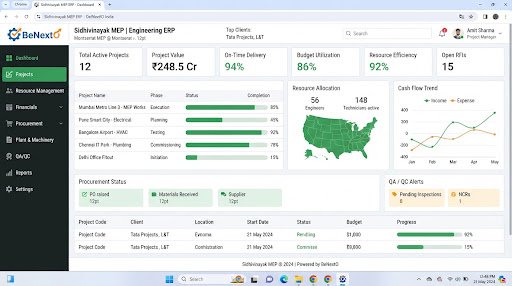
Operational Landscape Overview
Who Needs This System?
Growing companies using manual spreadsheets for core workflows
Enterprises restricted by rigid parameters in ready-made software packages
Firms requiring complete intellectual property and codebase ownership
Teams needing secure database portals to organize customer files, stock lists, and tasks
Common Issues Resolved
Software Limitation Blocks
Ready-made tools restrict database fields and user roles, slowing down custom operations.
Steep Per-User Seat Fees
Scaling software licenses as teams grow increases operational overhead.
Scattered Operational Data
Company records are split across personal documents, causing version control issues.
Functional System Modules
To match your operational requirements, possible modules we can engineer include:
Bespoke Database Panels
Organizes corporate database records matching your operations structures.
- Custom entry forms
- Multi-table search filters
- File attachment fields
Unified Management Boards
Centralizes department schedules, task priorities, and milestone approvals.
- Department roster grids
- Milestone checklists
- Activity logs
Example System Workflow
Process Intake
Operator registers transactions details on dashboard.
Validate Log
System validates details against pre-set business rules.
Sync Database
System updates related tables, generating custom PDF files.
Send Alert
System dispatches automated SMS or email alert to coordinator.
Archive File
Document registers in secure archives for audit trails.
* Note: Workflows are configured and customized strictly around your business operational patterns.
Scannable Features Matrix
Custom Data Fields
Configure custom database structures to log industry-specific parameters.
Purpose: Adapts to your exact business rules.
Access Control Registers
Granular permissions configured by user role and department.
Purpose: Maintains data security.
Activity Log Audits
Logs every database entry, edit, and export completed in the system.
Purpose: Ensures operational accountability.
Automation Opportunities
Inquiry forms capturing data to generate task logs automatically.
Overdue project milestones triggering email updates to managers.
Approved invoicing totals posting directly to monthly reporting files.
Role-Based Access Controls
System Director
Full database permissions, system setting configurations, and audit trail viewing.
Division Manager
Adjust team rosters, approve task completions, and export reports.
Staff Member
Create database records, update task cards, and upload files.
Reporting & Dashboard Areas
Division Activity
Active logs tracking task completions by department.
Inbound Volume
Breakdown counts of transactions processed by period.
Audit Summaries
Reports tracking database updates by user.
Generic Integration Possibilities
Secure custom REST APIs
UPI & payment terminals checkouts
Biometric log devices logs syncs
Email & SMS alerts gateways
Implementation Blueprint
01 Requirement Discovery
02 Process Flow Mapping
03 Database Architecture Planning
04 User Interface Layouts Design
05 Custom Code Engineering
06 Strict QA Verification Testing
07 System Rollout Deployment
08 User Optimization
Cost Sizing Drivers
Number of modules integrated into the system database
Volume of historical sheets records to migrate
API connection requirements for legacy tools
Target Industry Mappings
Relevant Project Execution
TASK Engineering Solutions
Corporate website and complete digital brand identity for a structural engineering consultancy.
Custom Business Software FAQs
Can the software be expanded as our business grows?
Yes, we structure the codebase with scalable layers, allowing you to add modules later.
Who owns the code of the custom software?
You own the intellectual property and source code of the custom software once development is complete.
Can we restrict database access for general staff?
Yes, role-based permissions allow you to define what fields different staff roles can view or edit.
How long does custom software development take?
Development timelines depend on project scope, but typical builds take between 12 to 24 weeks.
Do you assist with historical data migration?
Yes, we handle data scrubbing and import legacy records into the custom database.
Where is the custom software hosted?
We deploy the software to secure cloud database servers or local network servers based on your guidelines.
Ready to Build Your Custom Custom Business Software?
Consult with our engineering architects in Pune. We deliver complete operational blueprints, schema diagrams, and milestone estimates.