
Custom Lead Management & Tracking Software
Intake client inquiries, route sales leads, and optimize follow-up pipelines.
Quick Answer: What is a custom lead management solution?
A custom lead management solution is a dedicated database engineered to capture, organize, and route incoming sales leads. It connects website forms and messaging channels, ensuring quick follow-ups without per-user SaaS license fees.
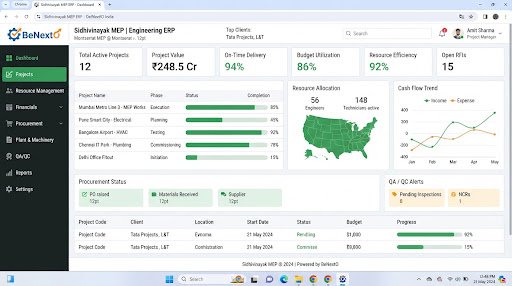
Operational Landscape Overview
Who Needs This System?
Real estate and travel firms managing high volumes of daily inquiries
Sales teams losing track of prospect contact logs and follow-up dates
Businesses needing to capture leads from different website forms and platforms
Managers needing clear logs of response times and rep activities
Common Issues Resolved
Forgotten Prospect Details
Prospect contacts and notes are lost in chat apps, slowing down rep follow-ups.
Unassigned Inquiries
No automated routing exists, leading to delays as inquiries sit in general mailboxes.
No Response Metrics
Managers cannot track how quickly sales reps respond to new inquiries.
Functional System Modules
To match your operational requirements, possible modules we can engineer include:
Lead Capture Registry
Intakes prospect details from website forms and registers new lead files.
- Inquiry form integration
- Duplicate entry detection
- Budget parameter fields
Lead Routing Panel
Assigns leads to active reps based on department and location rules.
- Round-robin assignment rules
- Reps calendar logs
- Reassignment selectors
Example System Workflow
Inbound Form Submit
System captures inquiry details from your website.
Check Duplicates
System scans database to verify if contact is a new lead.
Route Lead
System assigns lead card to active rep, dispatching email alert.
Log Call
Rep calls prospect, logging discussion notes in history.
Set Follow-Up
Rep creates follow-up task card with alert reminder.
* Note: Workflows are configured and customized strictly around your business operational patterns.
Scannable Features Matrix
Round-Robin Router
Routes new inquiries to active sales reps automatically in rotation.
Purpose: Maintains balanced sales workloads.
Interaction Log Feed
A chronological feed capturing call logs, email files, and note updates.
Purpose: Keeps reps aligned on customer histories.
Action Reminders
Generates check-in alerts linked to active prospect cards.
Purpose: Prevents follow-up delays.
Automation Opportunities
Website inquiry forms generating CRM lead cards automatically in real-time.
Lead reassignment routines transferring cards after 12 hours of inactivity.
Completed check-in logs sending automated updates to managers.
Role-Based Access Controls
Sales Admin
Configure routing logic, adjust rep priorities, delete records, and download activity reports.
Sales Rep
Claim lead cards, update profiles, log calls, and set task reminders.
General Manager
View lead dashboards and monitor response times.
Reporting & Dashboard Areas
Response Velocity
Time taken by reps to make initial contact with new leads.
Source Metrics
Performance charts tracking lead volumes by marketing channel.
Rep Activities
Summary counts of calls, emails, and meetings logged by staff.
Generic Integration Possibilities
Website forms endpoints
WhatsApp API routers
Email dispatch servers
SMS alerts gateways
Implementation Blueprint
01 Requirement Discovery
02 Process Flow Mapping
03 Database Architecture Planning
04 User Interface Layouts Design
05 Custom Code Engineering
06 Strict QA Verification Testing
07 System Rollout Deployment
08 User Optimization
Cost Sizing Drivers
Number of source platform integrations to connect
Complexity of automated routing rules
Lead scoring algorithms requirements
Related Technical Services
Lead Management FAQs
Can we capture leads from website forms?
Yes, we connect website form endpoints to route inquiries directly into the database.
How does automated lead routing work?
The system assigns leads to sales reps based on shift calendars, territories, or rotation rules.
Can we block spam inquiries?
Yes, we integrate validation rules and CAPTCHA components to filter spam submissions.
Can we track client interaction logs?
Yes, reps can log call notes and email files directly under prospect profiles.
Does the system support lead staging?
Yes, custom pipeline boards display deal phases from initial capture to final sale.
Is training provided for sales teams?
Yes, we conduct hands-on training sessions and provide user manuals for sales staff.
Ready to Build Your Custom Lead Management?
Consult with our engineering architects in Pune. We deliver complete operational blueprints, schema diagrams, and milestone estimates.