
Custom Invoicing & Business Billing Software
Custom invoicing interfaces, tax ledger tracking, and client records.
Quick Answer: What is a custom billing solution?
A custom billing solution is a bespoke invoicing system designed to match your specific payment structures. Unlike off-the-shelf software, it automates milestone calculations, tax adjustments, and payment tracking with zero monthly per-user fees.
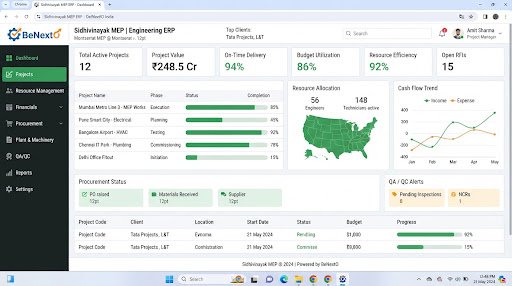
Operational Landscape Overview
Who Needs This System?
B2B firms managing multi-stage milestone payments on spreadsheets
Service agencies spending hours compiling monthly customer invoices manually
Businesses requiring custom tax structures or localized invoice templates
Accounting teams needing real-time logs of outstanding accounts receivables
Common Issues Resolved
Manual Invoice Creation
Drafting invoices manually leads to calculation errors and delays billing cycles.
Delayed Payment Tracking
Checking bank files against spreadsheets to identify paid invoices is slow and error-prone.
Inflexible Payment Terms
Standard software cannot handle split payments, custom milestone terms, or tax structures.
Functional System Modules
To match your operational requirements, possible modules we can engineer include:
Invoice Generation Registry
Creates customizable client invoices with tax and discounts calculation.
- Invoice template builders
- Tax rate calculators
- Discount selectors
Receivables Tracking Panel
Logs outstanding payments, payment terms, and sends payment reminders.
- Due date calendars
- Automated email alerts
- Payment record registers
Example System Workflow
Log Project Milestone
System registers task completion on project dashboard.
Draft Invoice
Billing manager reviews pre-filled invoice draft with milestone details.
Send Invoice
System dispatches PDF invoice to client contact email.
Log Payment
Accountant registers payment receipt against active invoice number.
Update Accounts
System updates ledger balances and tax registers automatically.
* Note: Workflows are configured and customized strictly around your business operational patterns.
Scannable Features Matrix
Milestone Billing Logic
Drafts invoice records automatically based on project milestone approvals.
Purpose: Speeds up billing for complex B2B projects.
PDF Generator
Generates custom invoice files containing your logo, terms, and tax details.
Purpose: Presents professional invoices to clients.
Client Account History
A secure log summarizing transactions, payments, and balances by client.
Purpose: Simplifies client account management.
Automation Opportunities
Milestone updates in work logs triggering automated invoice drafts.
Overdue invoice alerts dispatching email reminders to clients.
Completed transactions posting data directly to tax dashboards.
Role-Based Access Controls
Billing Administrator
Adjust tax rates, configure invoice templates, approve discounts, and run audits.
Billing Officer
Draft client invoices, log payments, and review outstanding accounts.
General Manager
View billing dashboards and download monthly revenue reports.
Reporting & Dashboard Areas
Receivables Balance
Summaries of outstanding payments by client and due date.
Sales Tax
Breakdowns of collected taxes by category for reporting.
Revenue Forecast
Estimated cash flows based on upcoming project milestones.
Generic Integration Possibilities
UPI & payment gateways
Email dispatch servers
SMS alert gateways
Accounting database hooks
Implementation Blueprint
01 Requirement Discovery
02 Process Flow Mapping
03 Database Architecture Planning
04 User Interface Layouts Design
05 Custom Code Engineering
06 Strict QA Verification Testing
07 System Rollout Deployment
08 User Optimization
Cost Sizing Drivers
Complexity of custom payment milestone rules
Number of dynamic PDF templates to design
Accounting software integration requirements
Related Technical Services
Relevant Project Execution
Sidhivinayak MEP Consultancy
Digitizing a paper-bound engineering consultancy via a custom multi-module ERP.
Billing Software FAQs
Can the software handle GST calculations?
Yes, custom billing modules calculate GST values based on item classification codes automatically.
Can we send automated payment reminders?
Yes, you can configure automatic email and SMS notifications to alert clients before invoices are due.
Does the system support recurring retainer invoices?
Yes, custom routines can generate and email monthly retainer invoices on pre-set dates.
Can we link invoices with bank receipts?
Yes, we build matching screens where accountants log bank reference numbers to mark invoices as paid.
Can we generate credit notes?
Yes, custom modules can issue credit notes to log returns or bill adjustments.
Is client database information encrypted?
Yes, database connections enforce SSL encryption to secure transaction files and client profiles.
Ready to Build Your Custom Billing Software?
Consult with our engineering architects in Pune. We deliver complete operational blueprints, schema diagrams, and milestone estimates.