
Custom Project & Task Management Software
Track tasks, coordinate project milestones, and log team timesheets.
Quick Answer: What is a custom project management solution?
A custom project management solution is a bespoke task database built to coordinate your specific operations. It unifies project stages, timelines, timesheets, and coordinator updates, removing monthly per-seat SaaS costs and rigid fields.
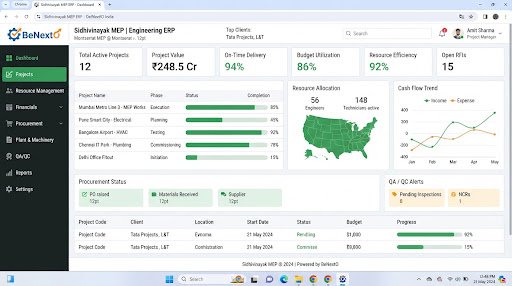
Operational Landscape Overview
Who Needs This System?
Consultancies coordinating multi-phase projects on spreadsheets
Managers losing track of task statuses across email and chat logs
Teams needing secure systems to share blueprints, design drafts, and files
Firms requiring timesheet tracking to log billable hours by project
Common Issues Resolved
Unsynchronized Task Statuses
Checking task progress across separate platforms causes delays and coordinator miscommunication.
Fragmented File Sharing
Blueprints and project files are scattered across personal folders, leading to version control issues.
Manual Timesheet Logging
Employees log hours on manual sheets, making project cost audits slow and inaccurate.
Functional System Modules
To match your operational requirements, possible modules we can engineer include:
Task Assignment Board
Creates project tasks, sets target dates, and assigns them to active team members.
- Kanban staging grids
- Priority check flags
- Task description fields
Milestone Tracking Board
Monitors project phases and tracks progress against target delivery dates.
- Gantt charts
- Milestone checkpoints
- Progress indicators
Example System Workflow
Define Project
Manager creates project record, setting milestone phases.
Assign Tasks
Coordinator creates task cards, assigning them to team members.
Log Hours
Employee logs work hours under the project timesheet.
Review Task
Coordinator reviews task completion, updating board status.
Complete Milestone
Approvals update milestone statuses, notifying stakeholders.
* Note: Workflows are configured and customized strictly around your business operational patterns.
Scannable Features Matrix
Interactive Timelines
Visually maps project phases against target delivery timelines.
Purpose: Helps teams hit project deadlines.
Timesheet Recorder
Allows staff to log billable and non-billable hours directly on task cards.
Purpose: Simplifies project cost calculations.
Version-Controlled File Store
Bespoke file repository to upload project blueprints and document folders.
Purpose: Ensures everyone uses the latest file versions.
Automation Opportunities
Task dependencies updating target dates automatically when phases shift.
Completed task reviews triggering notifications to project managers.
Due date reminders alerting employees of upcoming tasks automatically.
Role-Based Access Controls
Project Administrator
Configure project templates, allocate team budgets, approve timesheets, and run audits.
Team Coordinator
Create task cards, assign resources, adjust timelines, and review task completions.
Team Member
Update assigned task cards, log daily hours, and upload files.
Reporting & Dashboard Areas
Milestone Status
High-level summaries of phase completions by project.
Resource Workload
Logs tracking active tasks and hours assigned by employee.
Timesheet Totals
Monthly summaries of work hours logged by project.
Generic Integration Possibilities
Calendar API routers
Email alerts notifications
SMS alerts gateways
Accounting database links
Implementation Blueprint
01 Requirement Discovery
02 Process Flow Mapping
03 Database Architecture Planning
04 User Interface Layouts Design
05 Custom Code Engineering
06 Strict QA Verification Testing
07 System Rollout Deployment
08 User Optimization
Cost Sizing Drivers
Integration complexity with corporate calendars and communication tools
Database storage scale for project drawings and blueprints
Timesheet calculation and approval rule complexity
Related Technical Services
Relevant Project Execution
Sidhivinayak MEP Consultancy
Digitizing a paper-bound engineering consultancy via a custom multi-module ERP.
Project Management FAQs
Can we limit access to client blueprints?
Yes, role-based access rules restrict file downloads and viewing permissions by department.
Does the software support Gantt chart views?
Yes, custom timeline modules can display project phases in Gantt configurations.
Can employees enter timesheet logs on mobile?
Yes, the project dashboards are optimized for mobile browsers to allow easy timesheet logging.
Can we track task dependencies?
Yes, custom scheduling rules can update downstream task dates when prior phases shift.
Does the system send daily task emails?
Yes, background routines can dispatch daily agendas of assigned tasks to team emails.
Is there a limit on active projects?
No, custom databases are built to manage unlimited active projects without performance lag.
Ready to Build Your Custom Project Management?
Consult with our engineering architects in Pune. We deliver complete operational blueprints, schema diagrams, and milestone estimates.